
This post is not strictly about security but rather about security-related tools. I focus on exploring the process and technology, not specifically on security issues.
Some time ago I wrote about How I use cloud VMs for coding. Now I thought I will use this project as an example for exploring threat modelling process.
There is an open source project, pytm, which is a Pythonic framework for threat modeling.
Let’s explore what this tool can do.
Usage
Dependencies
Start by installing pytm and its dependencies. Assuming you are running on Ubuntu, run:
pip install pytm
sudo apt install graphviz plantuml
Model as code
Let’s create the model (save it as model.py):
#!/usr/bin/env python3

from pytm.pytm import TM, Server, ExternalEntity, Dataflow, Boundary, Actor, Data

tm = TM("Cloud VMs for development")
tm.description = "How I use cloud VMs for development"
tm.isOrdered = True

Laptop = Boundary("Laptop")
AWS = Boundary("AWS")

user = Actor("User")
user.inBoundary = Laptop

vm = Server("EC2 VM")
vm.OS = "Ubuntu"
vm.isHardened = True
vm.inBoundary = AWS
vm.onAWS = True

sg = ExternalEntity("Security Group")
sg.inBoundary = AWS

allow_ip = Dataflow(user, sg, "User allows access from own IP address")
allow_ip.protocol = "AWS API"
allow_ip.data = Data("User IP address")

start_vm = Dataflow(user, vm, "User starts EC2 instance")
start_vm.protocol = "AWS API"

read_vm_dns = Dataflow(vm, user, "User reads DNS name of EC2 instance")
read_vm_dns.protocol = "AWS API"

use_vm = Dataflow(user, vm, "User uses VM")
use_vm.protocol = "SSH"
use_vm.data = "Development commands and data"
use_vm.dstPort = 22

stop_vm = Dataflow(user, vm, "User stops VM")
stop_vm.protocol = "AWS API"

tm.process()
Elements
You can see that we are creating various elements like Server or Actor. The complete list of all possible elements can be read from the tool itself:
python3 model.py --list-elementsCurrently, following elements are supported:
Elements:
Actor          -- An entity usually initiating actions
Asset          -- An asset with outgoing or incoming dataflows
Boundary       -- Trust boundary groups elements and data with the same trust level.
Dataflow       -- A data flow from a source to a sink
Datastore      -- An entity storing data
ExternalEntity --
Lambda         -- A lambda function running in a Function-as-a-Service (FaaS) environment
Process        -- An entity processing data
Server         -- An entity processing data
SetOfProcesses --

Atributes:
Action         -- Action taken when validating a threat model.
Classification -- An enumeration.
Data           -- Represents a single piece of data that traverses the system
Lifetime       -- An enumeration.
TLSVersion     -- An enumeration.
Report template
The tool can generate a report, but it needs a template to do it. A sample template can be downloaded from GitHub:
wget <https://raw.githubusercontent.com/izar/pytm/master/docs/basic_template.md>Running
As you might have noticed, the model.py file is used as an entry point. We will use it for generating reports and graphs.
python3 model.py --dfd | dot -Tpng -o dfd.png
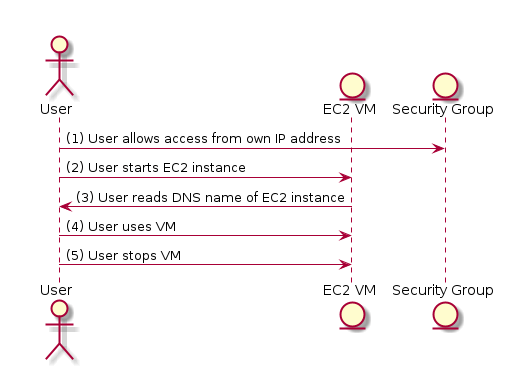
python3 model.py --seq | plantuml -tpng -pipe > seq.png
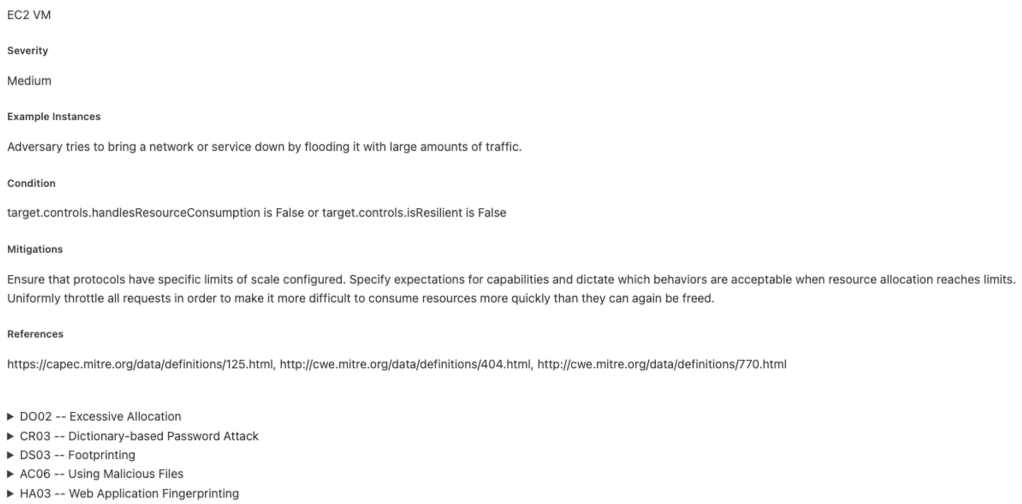
python3 model.py --report basic_template.md > report.md
For this example, following diagrams are generated:

Also, a large report is generated, below is the snippet from it:
Digging deeper
In this example, the report contains many issues that are sometimes hard to understand. Let’s add more details to the template so we can see the conditions in the report. Add the following lines to the last section of basic_template.md:
  <h6>Condition</h6>
  <p>{{item.condition}}</p>
Now, for each issue, we can see which condition triggered it. All possible issues are described in the following JSON file.
By understanding the condition, we can better define our elements. Using the condition, we can further configure components. For example:
vm.controls.authenticatesSource = True
vm.controls.encodesOutput = True
vm.controls.sanitizesInput = True
vm.controls.checksInputBounds = True
vm.controls.validatesInput = True
vm.controls.hasAccessControl = True
vm.controls.authorizesSource = True
In this way, we will keep adding details to the model until we identify actual vulnerabilities in the project.
My thoughts
In general, it’s a good idea to have threat modeling as code. I like the “as code” approach to everything, and this is no exception. pytm looks promising, but it currently lacks some features, especially for projects other than standard web applications.
The good things
- Your project is described as Python code, and the tool generates data-flow and sequence diagrams for you. Sure, you can define both in a diagramming tool, but
pytmkeeps them in sync whenever changes are made. And due to the nature of software, changes WILL be made. - Plug-in architecture for threat descriptions. You can write your own JSON file with vulnerabilities and use it to scan your project. This is a maintainable way of defining threats and creating threat catalogs.
The bad things
- The variety of elements to choose from seems limited. Even with my example, I felt like some classes of elements are missing or restrictive. For instance,
Serverseems designed to model a typical web server. There could be a better set of generic components, which would be especially useful for embedded projects. Maybe inheritance would be a good idea? - The threats description file binds each threat to an element class. For example,
Buffer Overflow via Environment Variablesonly applies toLambdaandProcess. If the model is wrong, some threats may be missed. This isn’t a problem if you know the details of the tool, but it can be misleading for non-experts. - You need to learn how to use the tool. It will help you with security only if your model is correct.
Summary
Overall, the project is interesting. In its current state, it is not universal for any project but can be extended to meet various needs.
Describing project components as Python objects and then generating diagrams and reports from them is a brilliant idea. It improves documentation maintainability, which is very important to me.
It is definitely a direction we should go, not only with security but also with software-related tasks in general.
 Maciej Galeja
You must be logged in to post a comment.